
Monitoring your business credit is key to maintaining financial health and securing better opportunities. Business credit scores, ranging from 0 to 100, differ from personal credit scores and are publicly accessible. Here’s a quick summary of how to monitor your business credit with Experian, Equifax, and Dun & Bradstreet (D&B):
- Experian: Offers tools like Intelliscore Plus to assess creditworthiness. You can subscribe to Business Credit Advantage for $199/year to access reports and set up alerts.
- Equifax: Focuses on lender data and offers scores like the Payment Index and Business Credit Risk Score. Access reports through resellers like Nav Prime ($39.99/month).
- D&B: Uses the PAYDEX score, which reflects your payment habits. Free tools like CreditSignal provide basic alerts, while paid plans start at $15/month.
Key Steps:
- Establish your business identity with an EIN and a D-U-N-S Number.
- Ensure vendors report payments to credit bureaus.
- Regularly review reports for errors and discrepancies.
- Set up alerts to catch changes in real time.
Quick Comparison:
| Bureau | Key Score | Focus Area | Monitoring Cost |
|---|---|---|---|
| Experian | Intelliscore Plus | Trade data, public records | $199/year |
| Equifax | Payment Index | Banking and lender data | $39.99/month (via Nav) |
| D&B | PAYDEX | Vendor payment history | Free to $39/month |
Monitoring your business credit helps you catch errors, improve scores, and secure better financial terms. Start by reviewing your reports and setting up alerts today.
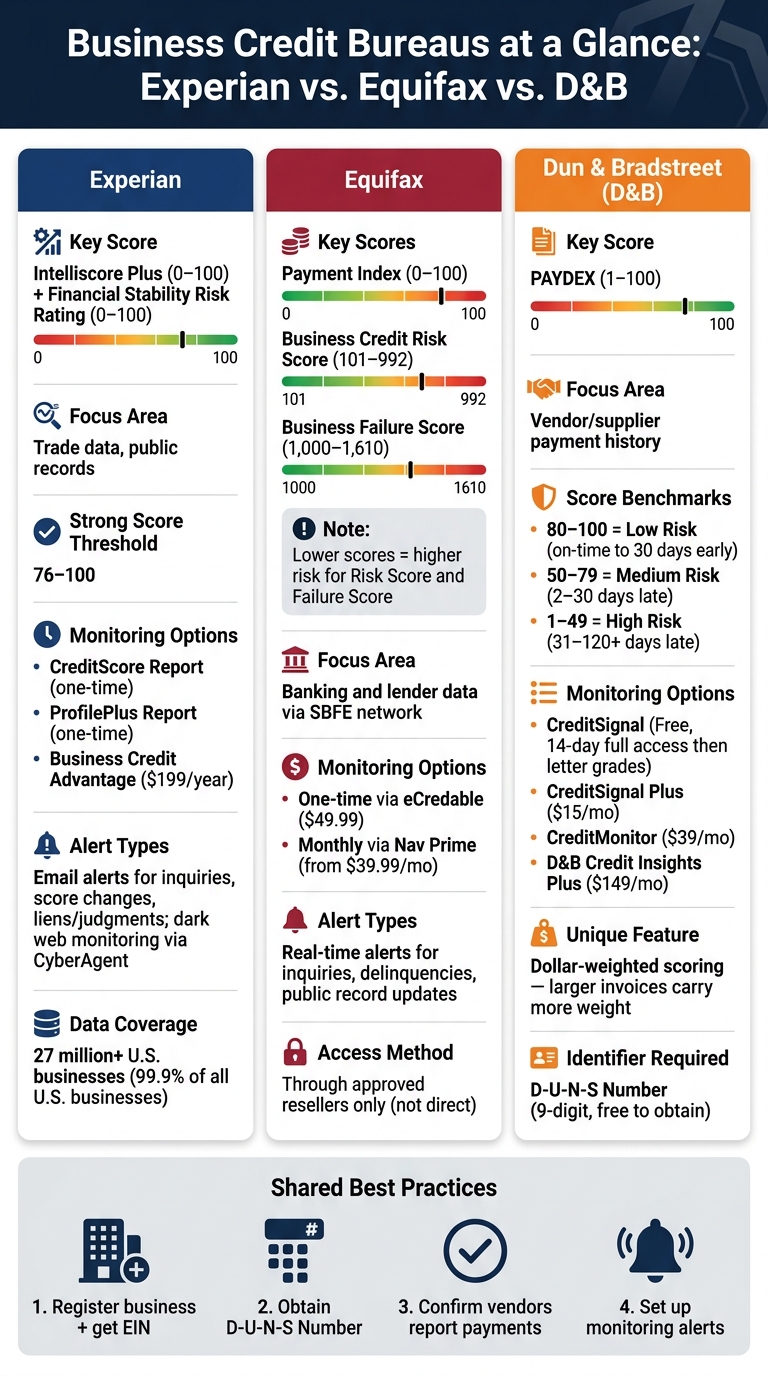
Business Credit Bureaus Compared: Experian vs. Equifax vs. D&B
How to Monitor Your Business Credit
sbb-itb-0a60575
Steps to Take Before You Start Monitoring
Before diving into business credit monitoring, it’s crucial to lay a solid foundation by securing and verifying your business identity.
Establishing Your Business Identity
Start by officially registering your business as a separate legal entity and obtaining an Employer Identification Number (EIN) from the IRS. This EIN is essential for opening business bank accounts, applying for credit, and building your credit profile. You can apply for an EIN directly through the IRS website (irs.gov) for free, and the process is quick and straightforward.
Make sure your business has a dedicated phone number and a consistent address. Any discrepancies here can create confusion in your credit profile.
"Think of your business credit file as a barometer for the financial reputation of your business." – Marco Carbajo, SBA Blog Contributor
Once your business identity is firmly established, the next step is securing your D-U-N-S Number.
Getting a D-U-N-S Number
The D-U-N-S Number, a nine-digit identifier from Dun & Bradstreet, is key to activating your D&B credit profile. It’s especially important if you plan to pursue government contracts or apply for federal grants.
Before applying, check the Dun & Bradstreet website by searching your company name, city, and state. Sometimes, Dun & Bradstreet creates profiles automatically using public records, so your business might already have a D-U-N-S Number without you knowing it. If no profile exists, you can apply for one for free at dnb.com. Keep in mind it may take up to 30 business days to receive the number after applying.
"By applying for a D&B number you are in fact registering with a business credit agency." – Marco Carbajo, SBA Blog Contributor
Once you have your D-U-N-S Number, double-check that all your business details are accurate before moving forward with vendor reporting.
Confirming Vendor Reporting
Here’s a common misconception: paying vendors on time automatically helps your business credit score. The truth is, it only matters if those vendors report your payment history to the credit bureaus. Before opening a net-30 account, confirm whether the vendor reports to Experian, Equifax, or D&B. If they don’t, you can either request they start reporting or look for vendors that already do. Keep in mind, it can take 30 to 90 days for a reported payment to show up on your credit profile, so addressing this early is critical.
"Trade credit won’t impact your business credit score unless the vendor or supplier reports your payments to business credit bureaus." – Karen Axelton, Senior Personal Finance Writer, Experian
Each bureau focuses on different data sources. For instance, D&B prioritizes supplier payment history, while Equifax pulls more data from lenders. This makes it important to ensure reporting is happening across all three bureaus.
How to Monitor Business Credit with Experian
Accessing Your Experian Business Credit Report
Start by visiting Experian’s business platform and following the steps to access and understand your credit report. Before diving in, make sure your business identity is established as previously outlined. Use the "Search for my business" tool to locate your file by entering your business name, location, or any related DBA or parent company names. These steps are specific to Experian, one of the three major credit bureaus.
Experian maintains credit data on over 27 million active U.S. businesses – covering both public and private companies – and accounts for 99.9% of all U.S. businesses. Even if you’ve never checked, your business likely already has a file.
For one-time access, Experian offers two options: the CreditScore Report and the ProfilePlus Report. The ProfilePlus Report provides additional details such as trade line data, inquiry history, and UCC filings. For ongoing access, the Business Credit Advantage subscription ($199/year) allows unlimited report views and daily monitoring.
Understanding Experian’s Credit Scores
Experian evaluates businesses using two main scoring models:
| Score | Measures | Scale |
|---|---|---|
| Intelliscore Plus | Likelihood of serious payment delinquency | 0–100 |
| Financial Stability Risk Rating | Risk of business failure or bankruptcy within 12 months | 0–100 |
Both scores are based on a 0-to-100 scale, with higher scores indicating better credit health. Generally, a score above 75 is considered strong. These scores are influenced by factors like payment history, total debt, credit utilization, credit history length, business size, and public records such as liens or judgments.
Pay special attention to credit utilization. Keeping this below 30% prevents score damage, but staying under 10% can actually help improve your score. Also, keep in mind that most businesses need at least one year of operating history before Experian and other bureaus can generate a score.
Next, let’s explore how to set up alerts to stay on top of these scores.
Setting Up Experian Monitoring and Alerts
After subscribing to Business Credit Advantage, Experian’s monitoring tools start working automatically. You’ll receive email alerts for significant changes, such as lender inquiries, score updates, or public record filings like liens or judgments. The dashboard also provides a three-month score trend, helping you track whether your credit health is improving or declining.
The subscription also includes CyberAgent, a tool that scans the internet for compromised business data. This dark web monitoring feature adds an extra layer of protection. Tammy, the owner of Alone at Home Pet Services, shared her experience after dealing with hackers:
"It is critical that ongoing monitoring is part of how they do business to safeguard their reputation."
Before applying for credit, monitor your report for at least three months to catch any errors and confirm accurate vendor reporting. This proactive approach can make a big difference.
How to Monitor Business Credit with Equifax
Accessing Your Equifax Business Credit Report
Keeping an eye on your Equifax business credit report is essential for protecting your company’s financial standing. However, unlike Experian, Equifax doesn’t provide direct access to business credit reports through its own portal. Instead, you’ll need to go through approved resellers. For a one-time report, eCredable offers the Business Credit Industry Report Plus 2.0 for $49.99. If you’re looking for ongoing monitoring, Nav Prime provides subscription plans starting at $39.99 per month.
To access your report, you’ll need to verify your identity through the reseller’s platform. These reports include key details like credit scores, borrowing history, and public records such as liens, judgments, and bankruptcies.
| Option | Provider | Cost | Best For |
|---|---|---|---|
| One-Time Report | eCredable | $49.99 | Pre-loan health checks |
| Monthly Monitoring | Nav Prime | Starting at $39.99/mo | Ongoing fraud protection & score tracking |
Understanding Equifax’s Business Credit Scores
Equifax gathers much of its business credit data from the Small Business Finance Exchange (SBFE), a network of U.S. lenders that report payment information on small business accounts. It’s worth noting that only lenders who are SBFE members will report your payment history, so it’s a good idea to check with your bank to confirm their participation.
Equifax offers three primary business credit scores:
| Score | Range | What It Predicts |
|---|---|---|
| Payment Index | 0–100 | Tracks payment behavior over the past year compared to industry norms. |
| Business Credit Risk Score | 101–992 | Assesses the likelihood of a 90-day severe delinquency or charge-off within the next year. |
| Business Failure Score | 1,000–1,610 | Predicts the likelihood of business failure or bankruptcy within the next year. |
For the Business Credit Risk Score and Business Failure Score, lower numbers mean higher risk, which might feel a bit counterintuitive at first. Equifax also offers a newer scoring system called OneScore for Commercial, which uses its Amplify AI model to predict default risks even more precisely. Together, these scores help round out your understanding of your business credit health, complementing insights from Experian and Dun & Bradstreet.
Setting Up Equifax Alerts
To enable monitoring, head over to the Equifax Small Business credit page and choose the "Monitor Credit Monthly" option to subscribe through Nav Prime. Once you’re enrolled, you’ll receive real-time alerts for any new inquiries, delinquencies, or updates to public records.
As Equifax explains:
"Reviewing your business credit regularly and establishing proactive credit monitoring is the best way to catch and protect your company’s financial reputation and credit health." – Equifax
Pay close attention to the public records section of your report. Mistakes like inaccurate liens or judgments can quickly harm your credit scores. Catching and disputing these errors early can make a big difference, especially before a lender reviews your file.
Once you’ve set up alerts with Equifax, you’ll be ready to move on to monitoring your business credit with Dun & Bradstreet in the next section.
How to Monitor Business Credit with Dun & Bradstreet
Verifying Your D-U-N-S Profile
Your D-U-N-S Number is a unique nine-digit identifier that links to your D&B credit file. To ensure your profile is accurate, use the D&B lookup tool on their website (dnb.com). You can search by your legal business name and address or by your company registration number. Be precise with your legal name – minor differences, like using "ST" instead of "STREET", can result in mismatches.
Updating basic details like your address or phone number is free. You don’t need to sign up for any paid services to correct these errors. After submitting updates, allow up to 48 hours for the changes to take effect.
Once your profile is updated, you can focus on understanding how your payment habits influence your PAYDEX score.
Understanding the PAYDEX Score
The PAYDEX score is Dun & Bradstreet’s primary business credit metric, and it works differently than scores from Experian or Equifax. It uses a scale from 1 to 100, focusing specifically on how quickly your business pays its bills.
This score is dollar-weighted, meaning larger transactions carry more weight. As LendingTree explains:
"Transactions are dollar weighted, meaning that a greater emphasis is placed on transactions with a higher dollar amount – a $100,000 invoice would be more impactful than a $1,000 invoice."
In simple terms, late payments on high-value invoices hurt your score more than multiple late payments on smaller ones. A score of 80 indicates on-time payments, while a perfect 100 requires consistently paying invoices 30 days early.
Here’s a quick breakdown of PAYDEX scores:
| PAYDEX Score | Payment Performance | Risk Level |
|---|---|---|
| 80–100 | On time to 30 days early | Low Risk |
| 50–79 | 2 to 30 days late | Medium Risk |
| 1–49 | 31 to 120+ days late | High Risk |
Your PAYDEX score is directly influenced by trade reporting from your vendors and suppliers. Make sure your key partners are reporting payment experiences to D&B regularly.
Once you understand your score, the next step is to set up alerts to monitor any changes.
Setting Up D&B Monitoring and Alerts
After grasping your PAYDEX score, you’ll want to track it in real time. Dun & Bradstreet offers several monitoring options based on your needs.
- CreditSignal (Free): Provides 14 days of full score access before switching to letter grades (A–F). You’ll also get basic alerts for score changes and report inquiries.
- CreditSignal Plus ($15/month): Grants unlimited access to your PAYDEX score and D&B Ratings, along with email alerts – an affordable choice for small business owners.
- CreditMonitor ($39/month): Includes industry benchmarking and detailed explanations for score changes.
- D&B Credit Insights Plus ($149/month): Designed for larger businesses, this plan monitors up to five email addresses and provides comparison data for up to five competitors.
Once enrolled in a plan, set up alerts to track score changes, new legal events, and updates to public filings. Pay special attention to the "TransferDUNSNumberRegistration" field, which notifies you if your D-U-N-S Number is retired or reassigned due to database updates or mergers. Catching such changes early can help you avoid disruptions to your credit file.
How to Handle Errors and Negative Items
Spotting and Disputing Errors
Even small mistakes – like a typo in your business name or an incorrect industry code – can cause issues like higher insurance premiums, credit denials, or even mixed files. When reviewing your reports, double-check key details such as your business name, address, employee count, and executive names. Also, be on the lookout for unfamiliar accounts or inquiries, which could indicate identity theft.
If you spot an error, here’s how you can dispute it with the major bureaus:
| Bureau | Dispute Method | Contact |
|---|---|---|
| Experian | Click "Submit Data Dispute" on the report | BusinessDisputes@Experian.com |
| Equifax | Use the dispute form at the bottom of the report | ExperianHelpdesk@SmartBusinessReports.com |
| D&B | Call customer service | 800-463-6362 |
For basic updates, such as changes to your address or industry code, an authenticated officer can update your record directly through BusinessCreditFacts.com without needing a formal dispute. Experian notes:
"Generally an investigation is completed within 30 days, however, complex cases may take longer."
If the investigation leads to any changes, Experian will send you a free commercial credit report to confirm the updates.
Once you’ve addressed any factual errors, it’s time to tackle legitimate negative items that cannot be removed.
Dealing with Legitimate Negative Items
After resolving errors, focus on improving your credit by managing valid negative items like liens or bankruptcies. While these items can’t be removed, you can work to offset their impact by creating a strong payment history.
SCORE emphasizes that consistent, on-time payments are crucial for improving your credit. Additionally, credit utilization – making up about 30% of your score – can improve by opening new trade accounts with suppliers who report to credit bureaus. Ensuring your current vendors report your payments can also make a big difference.
Building a Regular Credit Monitoring Routine
Combining Credit Monitoring with Financial Reviews
Make credit monitoring a natural part of your monthly financial routine. A simple way to do this is by setting a recurring calendar reminder to review your business credit reports whenever you close your books or go over bank statements. This approach ensures credit monitoring isn’t just an afterthought. For example, if you’ve been paying vendors on net-30 terms to establish trade lines, your monthly review will confirm whether those payments are reflected on your credit reports. If discrepancies show up, it’s your chance to address them promptly. Regular checks like this help keep your business credit profile accurate and current.
Key Metrics to Track
To make the most of your reviews, focus on specific metrics that paint a clear picture of your credit health. Beyond just checking your overall score, pay attention to these key indicators:
| Metric | Target | Why It Matters |
|---|---|---|
| D&B PAYDEX Score | 80–100 | Reflects consistent, on-time payments |
| Experian Intelliscore Plus | 76–100 | Shows lenders you’re a low credit risk |
| FICO SBSS Score | 155+ | Minimum needed for SBA 7(a) loan pre-qualification |
| Credit Utilization | Below 30% | Keeps scores strong across all bureaus |
Don’t stop there – also keep an eye on public records, unfamiliar inquiries, and updates to your company details, like SIC or NAICS codes. Incorrect industry codes can quietly harm your credit rating.
Another important detail: Experian retains trade data for 36 months, while bankruptcies can linger on your report for up to nine years and nine months. Knowing these timelines helps you set realistic goals for improving your credit profile. Tracking these metrics monthly is a proactive way to maintain control over your credit standing.
Using Monitoring to Strengthen Your Financial Position
Regular monitoring isn’t just about staying out of trouble – it can also help you seize opportunities. As SCORE advises:
"Reviewing your business credit report at least once a month, disputing any errors, and adding missing information can help boost your business credit score."
A well-maintained credit profile can give you the upper hand in vendor negotiations and even reduce financing costs. Before applying for a loan or signing a major vendor agreement, always pull an updated report to ensure there are no recent negative items that could lead to an automatic rejection.
Because business credit reports are public, lenders, vendors, and even competitors can access them without your consent. Regular monitoring isn’t just a good habit – it’s essential for controlling the narrative your credit profile tells.
Conclusion: Taking Control of Your Business Credit
Business credit isn’t static – it requires consistent attention. A one-time review won’t cut it. By building on these foundational steps and committing to regular monitoring, you can shift from simply reacting to issues to actively strengthening your credit profile. Keeping tabs on your reports from Experian, Equifax, and D&B provides a complete view of how lenders, vendors, and partners perceive your business.
Strong scores – like a solid PAYDEX, a dependable Experian rating, and a favorable Equifax risk profile – can unlock better vendor terms and improve loan opportunities. Make sure your vendors are reporting, regularly pull reports from all three bureaus, set up alerts for changes, and address inaccuracies as soon as they appear. Following this roadmap helps you maintain a healthy credit profile.
The advantages are tangible. Higher scores across the major bureaus can mean lower interest rates, more flexible repayment terms, and greater negotiating power with suppliers. Since business credit reports are publicly accessible – unlike personal credit – staying on top of your profile is crucial. By actively monitoring your credit through these bureaus, you take control of your financial story, shaping it before anyone else does.
Start today by reviewing your reports and setting up regular check-ins. The earlier you take charge of your business credit, the more doors you’ll open when opportunities arise.
FAQs
How often should I check my business credit reports?
Keeping tabs on your business credit reports is a smart way to safeguard your company’s financial health. By reviewing them regularly – whether quarterly or at least twice a year – you can quickly spot and address any errors or potential issues before they become bigger problems. Consistent monitoring helps ensure your credit profile stays accurate and current, which plays a key role in making sound financial decisions and managing your business effectively.
Why don’t my on-time vendor payments show up on my business credit?
On-time vendor payments often don’t show up on your business credit report. Why? Credit bureaus like Experian, Equifax, and Dun & Bradstreet primarily concentrate on trade credit data. For your payment history to appear, vendors or creditors need to actively report it. If they don’t, those consistent, timely payments won’t make it onto your business credit profile.
What’s the fastest way to raise my PAYDEX and Intelliscore Plus scores?
To give your PAYDEX and Intelliscore Plus scores a boost, focus on paying bills early and practicing solid credit habits. For PAYDEX, aim to pay invoices 10-20 days before the due date and confirm that vendors report your payments to Dun & Bradstreet. For Intelliscore Plus, prioritize maintaining a consistent payment history, keeping credit utilization low, and regularly monitoring your score to catch and correct any errors quickly.
Related Blog Posts
- Credit Score Estimator to Boost Your Rating
- What Credit Score Do You Need to Buy a House?
- Common Balance Transfer Mistakes to Avoid
- Paying Off Debt: Short-Term Credit Score Changes

Karla Moss is a CPA and former startup Controller who spent 15 years managing finance at the executive level — including inside a company that grew to unicorn status. She founded Karla & Co. to bring real-world financial clarity to everyday money decisions. She’s based in Phoenix, AZ and writes from personal experience as much as professional expertise.